Useful Sides
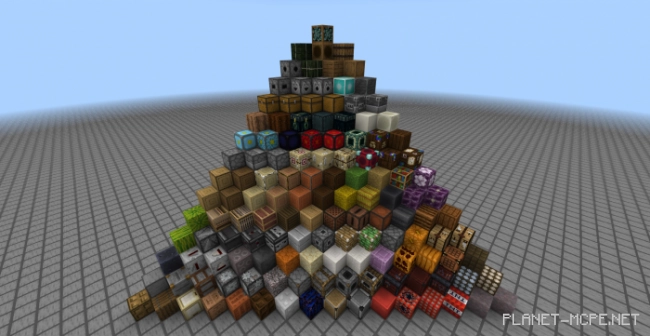
Unfortunately, in the vanilla Minecraft , we are unable to utilize all sides of blocks. This is actually a significant drawback, as there are times when it’s necessary to position a block so that its front faces the desired direction. The mod “Useful Sides ” addresses this issue by allowing players to rotate blocks around their axis by up to 360 degrees. It includes 134 blocks and nearly every vanilla texture, and the mod also reintroduces some removed blocks and hidden textures.
To craft these blocks, place a block in the center and then add a chisel. Feel free to try out different variations and just experiment.
All Items:
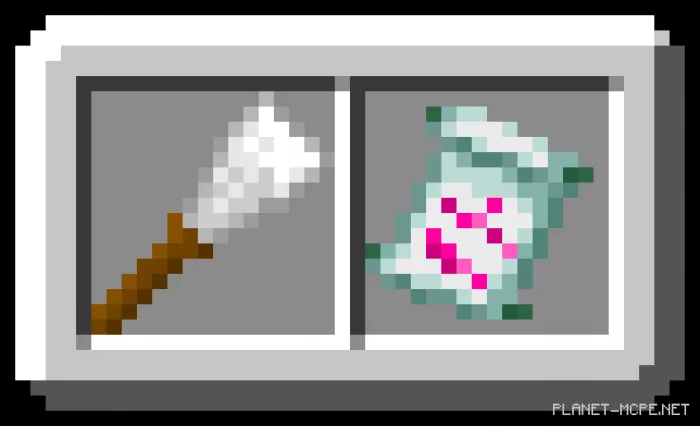
chisel – a tool used for shaping each side of blocks.alpha_scroll – an alpha scroll utilized for crafting gravel from an earlier version of Minecraft Bedrock .
All Blocks
trapped_planks_oak = stuck oak boards
trapped_planks_spruce = stuck spruce boards
trapped_planks_birch = stuck birch boards
trapped_planks_jungle = stuck jungle boards
trapped_planks_acacia = stuck acacia boards
trapped_planks_dark_oak = stuck dark oak boards
trapped_iron_block = stuck iron block
crying_obsidian = crying obsidian
build_allow = construction permission
build_deny = construction prohibition
border = boundary
tnt_top = TNT (top)
tnt_side = TNT (side)
tnt_bottom = TNT (bottom)
new_stone_cutter_top = new stone cutter (top)
new_stone_cutter_bottom = new stone cutter (bottom)
new_stone_cutter_side = new side stone cutter
old_stone_cutter_top = old top stone cutter
old_stone_cutter_side = old side stone cutter
gravel_old = ancient gravel
smoker_top = smoker (top)
smoker_side = smoker (side)
smoker_front = smoker (front)
smoker_bottom = smoker (bottom)
smithing_table_top = blacksmith’s table (top)
smithing_table_side = blacksmith’s table (side)
smithing_table_front = blacksmith’s table (front)
smithing_table_bottom = blacksmith’s table (bottom)
anvil_base = anvil (base)
repeater_base = repeater (base)
comparator_base = comparator (base)
brewing_stand_base = brewing stand (base)
sand_cobblestone = sandstone cobblestone
red_sand_cobblestone = red sandstone cobblestone
quartz_chiseled_top = carved quartz (top)
quartz_pillar_top = quartz column (top)
purpur_pillar_top = purple column (top)
pumpkin_top = pumpkin (top)
pumpkin_front = pumpkin (front)
pumpkin_side = pumpkin (side)
piston_top_sticky = sticky piston (top)
piston_top_normal = regular piston (top)
piston_bottom = piston (bottom)
piston_inner = piston (inner)
stone_slab_side = stone slab (side)
observer_top = observer (top)
observer_side = observer (side)
observer_front = observer (front)
observer_back = observer (back)
melon_top = melon (top)
melon_side = melon (side)
loom_top = weaving machine (top)
loom_side = weaving machine (side)
loom_front = weaving machine (front)
loom_bottom = weaving machine (bottom)
lectern_top = podium (top)
slt_oak = stripped oak log (top)
slt_spruce = spruce log (top)
slt_birch = stripped birch log (top)
slt_jungle = cleaned jungle log (top)
slt_acacia = cleaned acacia log (top)
slt_dark_oak = cleaned dark oak log (top)
lt_oak = oak log (top)
lt_spruce = spruce log (top)
lt_birch = birch log (top)
lt_jungle = jungle log (top)
lt_acacia = acacia log (top)
lt_dark_oak = dark oak log (top)
jukebox_top = music box (top)
jukebox_side = side-mounted music player
itemframe_background = background frame for items
hopper_inside = internal loading funnelhopper_outside = external loading funnel
hay_block_top = top hay block
hay_block_side = side hay block
grass_path_top = top grass path
furnace_top = top of the furnace
furnace_side = side of the furnace
furnace_front = front of the furnace
nrc_old_0 = old Nether reactor core (0)
nrc_old_1 = old Nether reactor core (1)
nrc_2 = Nether reactor core (2)
nrc_new_0 = new Nether reactor core (0)
nrc_new_1 = new Nether reactor core (1)
fletching_table_top = top of the fletching table
fletching_table_side = side of the fletching table
fletching_table_front = fletching table (front)
farmland_dry = dry farmland (top)
farmland_wet = wet farmland (top)
end_portal_frame_top = End portal frame (top)
trapped_chest_front = trapped chest (front)
enchanting_table_top = enchanting table (top)
ender_chest_top = Ender chest (top)
ender_chest_side = Ender chest (side)
ender_chest_front = Ender chest (front)
dropper_facing_horizontal = dropper (horizontal)
dropper_facing_vertical = dropper (vertical)
dried_kelp_top = dried kelp (top)
dried_kelp_side = dried kelp (side)
dispenser_facing_horizontal = dispenser (horizontal)
dispenser_facing_vertical = dispenser (vertical)
grass_top = grass (top)
mycelium_top = mycelium (top)
podzol_top = podzol (top)
dayd_bottom = daylight sensor (bottom)
dayd_top = daylight sensor (top, normal)
dayd_top_inverted = daylight sensor (top, inverted)
crafting_table_top = crafting table (top)
crafting_table_side = crafting table (side)
crafting_table_front = crafting table (front)
composter_side = composter (side)
composter_bottom = composter (bottom)
chorus_plant_side = chorus plant (side)
chorus_flower_side = chorus flower (side)
chorus_flower_side_dead = chorus flower (side, dead)
chest_top = chest (top)
chest_side = chest (side)
chest_front = chest (front)
ct_top = mapping table (top)
ct_side1 = mapping table (side 1)
ct_side2 = mapping table (side 2)
ct_side3 = mapping table (side 3)
bookshelf_side = Bookshelf (side)
bone_block_top = bone block (top)
bone_block_side = bone block (side)
blast_furnace_top = blast furnace (top)
blast_furnace_side = blast furnace (side)
blast_furnace_front = blast furnace (front)
beacon_side = beacon (side)
barrel_top_closed = barrels (top, closed)
barrel_top_opened = barrels (top, opened)
barrel_top_opened_fish = barrels (top, opened, with fish)
barrel_side = barrels (side)
barrel_bottom = barrels (bottom)
Installing Useful Sides (.mcpack)
Download the mod labeled as “.mcpack ” below.
Run the downloaded file to import the add-on/texture into Minecraft .
Open Minecraft Pocket Edition and navigate to the world settings.
Set the imported options for the world: Resource Packs Add-on Packs
Select the imported resource packs/add-ons in each section.
It is recommended to restart the game client Minecraft PE afterwards.
Launch Minecraft Pocket Edition , enter the previously configured world Minecraft , and enjoy the add-on!