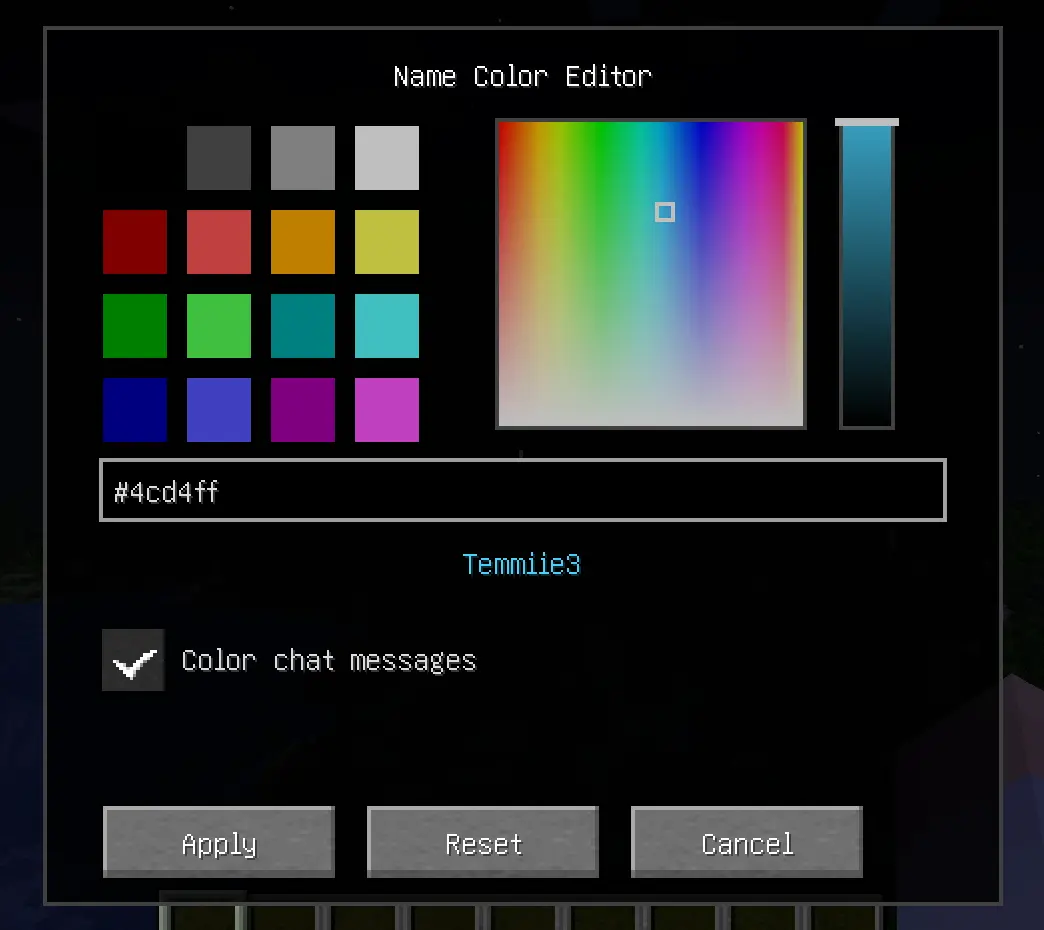
Enhance your Minecraft server’s identity! Name Color Editor is a lightweight Fabric mod that allows every player to express themselves by choosing a custom color for their username.
# 🎨 Name Color Editor
Enhance your Minecraft server’s identity! Name Color Editor is a lightweight Fabric mod that allows every player to express themselves by choosing a custom color for their username and chat messages.
✨ Features
Professional HSB Picker: Open a beautiful, clean color editor with `/namecolor`.
16 Classic Swatches: All standard vanilla Minecraft colors.
Hue-Saturation Square: Pick any hue with precision.
Brightness Slider: Fine-tune the luminosity of your chosen color.
Chat Coloring Toggle: Choose between coloring just your name or both your name and chat messages.
Responsive UI: Optimized layout that works on all screen sizes and GUI scales.
Hex Support: Type or paste any `#RRGGBB` code for total precision.
Universal Visibility: Your chosen color is shown in:
💬 Chat messages (optional)
📜 Tab list
🏷️ Floating Nametags (above your head)
Server-Side Sync: Colors are synchronized automatically across all online players.
Persistent Storage: Your color preferences are saved to the server and persist across restarts.
🚀 Installation
🖥️ Client & Server
This mod is required on both the Client and the Server.