📢 Купить рекламу на сайте  — узнать цены и условия размещения!
📢
Купить рекламу на сайте — узнать цены здесь →

Java Debug Screen

Java Debug Screen
11.04.2026 Mods admin 0 comments 1 min 283 views

The Java Debug Screen serves as further evidence that players care about Minecraft on Android. This modification introduces features commonly found in many games, and it certainly includes elements that should be part of Minecraft.

Functionality of the Java Debug Screen Mod

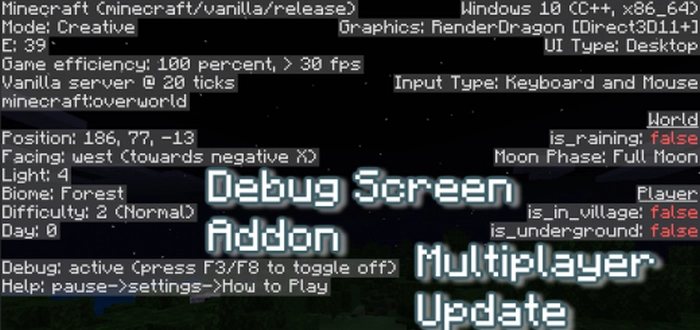
Экран отладки | Мод Экран отладки из Java

With the mod, you can access the debug screen of Minecraft directly from your smartphone. You’ll encounter a variety of intriguing parameters. On the left side of the panel:

  • Version of Minecraft (can be modified by yourself)
  • Performance efficiency
  • Ticks
  • Number of entities within render distance
  • Measurement in MCPE
  • Character position
  • Coordinates of the object the character is looking at
  • Light level
  • Current biome
  • Current difficulty
  • Amount of game time (in local days)
  • Debug mode
  • Game assistance

The right panel in Minecraft Bedrock:

  • Processor and OS architecture
  • Rendering engine
  • User interface variant
  • Controller type
  • World information – weather and lunar phase
  • Some details about the character

Make sure to enable experimental features on the map for the mod to function properly.
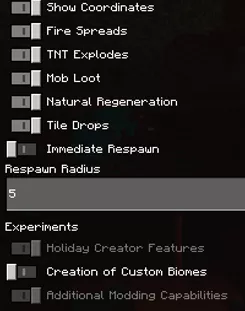
Экспериментальные настройки | Мод Экран отладки из Java

To enable it on your smartphone, use the F3 key in the game, and for PC, press F8. It is compatible with other mods. Enjoy your gaming!

Leave a comment