📢 Купить рекламу на сайте  — узнать цены и условия размещения!
📢
Купить рекламу на сайте — узнать цены здесь →

Dilophosaurus and Oviraptor
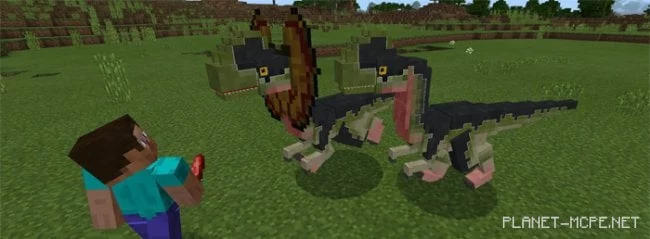
Dilophosaurus and Oviraptor
10.04.2026 Mods admin 0 comments 3 min 210 views

How many dinosaurs have you encountered in your lifetime? I bet none! 😉 Now, you have the chance to see dinosaurs in your favorite game, Minecraft PE. To do this, you need to download and install the modDilophosaurus and Oviraptor” for Minecraft Pocket Edition, which introduces two new dinosaurs into the game: the Dilophosaurus and the Oviraptor. The Dilophosaurus is a well-known dinosaur, recognized for its large, round crests and its dangerous ability to spit venom at its enemies in the MCPE world. The Oviraptor, on the other hand, is more famous for being an egg thief, with its favorite target being chickens!

Dilophosaurus

It’s best to keep your distance from this dinosaur, as it will immediately attack with its venom if it spots any mob or player nearby. When the Dilophosaurus engages in combat in MCPE, it unfurls its crests, which are not visible when it is calm. Dilophosaurs tend to avoid players, but if you get too close, they will have no choice but to defend themselves.

This dinosaur replaces the regular skeleton and the wither skeleton in Minecraft Pocket Edition.
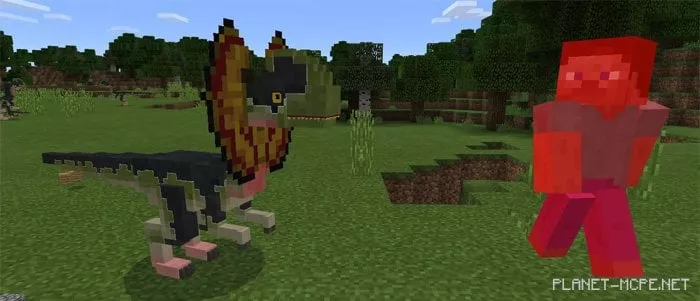
Mod Dilophosaurus and Oviraptor 1.0/0.17.0/0.16.1/0.16.0

Everyone knows that dinosaurs are carnivores, right? Like all predators, they are attracted to meat! Hold meat in your hand to catch the attention of a Dilophosaurus! This is a very useful feature in Minecraft PE survival mode if you want to avoid being attacked by the dinosaur.

You can also breed Dilophosaurs! Feed two of them meat and wait just under 10 seconds for a new dinosaur to appear.
Mod Dilophosaurus and Oviraptor 1.0/0.17.0/0.16.1/0.16.0

Oviraptor

The Oviraptor also prefers to steer clear of players in Minecraft Pocket Edition. They will only attack if you provoke them, forcing them to defend themselves. This dinosaur is quite weak, so it won’t be hard to defeat it if necessary. (Damage: 1-3 units, Health: 5 hearts). Upon defeat, it drops a few feathers.
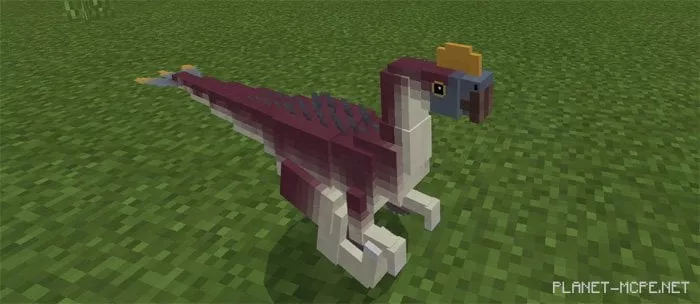
Mod Dilophosaurus and Oviraptor 1.0/0.17.0/0.16.1/0.16.0

The Oviraptor has only one target – the chicken. If it spots a chicken in Minecraft PE, it will run after it and try to kill it.
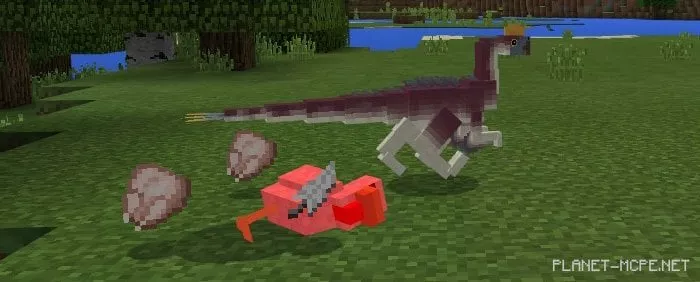
Mod Dilophosaurus and Oviraptor 1.0/0.17.0/0.16.1/0.16.0

Growth Stages

A baby dinosaur can be raised with any type of meat from the MCPE world.
Mod Dilophosaurus and Oviraptor 1.0/0.17.0/0.16.1/0.16.0

Dilophosaurus

  • Stage 1
    • Health: 3 hearts
    • Friendly
  • Stage 2
    • Health: 5 hearts
    • Friendly
  • Stage 3
    • Health: 7.5 hearts
    • Friendly
  • Stage 4
    • Health: 10 hearts
    • Ability to spit venom that damages and poisons enemies (Important! The poison effect only works in Minecraft 1.0+)
  • Stage 5
    • Health: 15 hearts
    • Ability to spit venom that damages and poisons enemies (Important! The poison effect only works in Minecraft 1.0+)

Oviraptor

  • Stage 1
    • Health: 3 hearts
    • Friendly
  • Stage 2
    • Health: 5 hearts
    • Neutral
    • Damage: 1-3 units

Installing Dilophosaurus and Oviraptor (.mcpack)

  • Download the mod marked as “.mcpack” below.
  • Run the downloaded file to import the addon/texture into MCPE.
  • Open Minecraft Pocket Edition and go to world settings.
  • Set the imported:
    Resource Packs.
    Addons.
  • Select the imported resource packs/addons in each section.
  • It is recommended to restart the Minecraft PE client afterward.
  • Launch Minecraft Pocket Edition, enter the previously configured world MCPE, and enjoy the addon!

Installing Dilophosaurus and Oviraptor (.zip)

  • Download the mod below.
  • Extract the two folders from the archive.
  • Move the “Dilophosaurus Behavior Pack” folder to /games/com.mojang/behavior_packs/
  • Move the “Dilophosaurus Resource Pack” folder to /games/com.mojang/resource_packs/
  • Launch Minecraft Pocket Edition.
  • Create a new world or edit an existing one.
  • Set the selected world with the resource pack and addon that you previously moved to the resource_packs and behavior_packs folders.
  • Done! Restart Minecraft PE and enjoy the game!

Leave a comment