Shaders Console
Shaders “Console ” have been specifically designed for Xbox , Playstation , and Switch , as support for shaders was removed from these platforms starting with version 1.12 in Minecraft . You will be able to utilize models that closely resemble those on consoles, crafted using unique techniques.
Features:
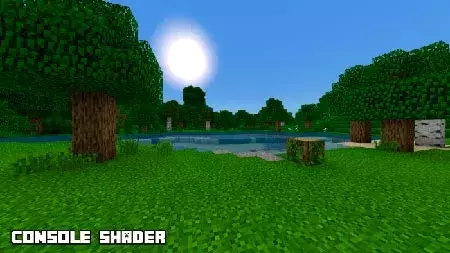
Swaying leaves.
Enhanced saturation and contrast.
Realistic sun and moon.
Improved transparency.
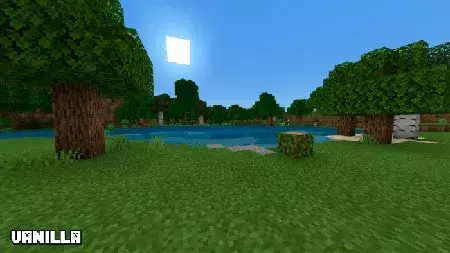
Vanilla Minecraft :
With shaders :iOS, Android , and Windows 10 .
Installing Console (.mcpack)
Download the shaders marked with — “.mcpack ” below.
Open the downloaded file to import the shaders into Minecraft .
Launch Minecraft Pocket Edition and navigate to world settings.
Set the imported: Resource Packs
Select the imported shaders in each section.
It is recommended to restart the Minecraft PE game client afterward.
Start Minecraft Pocket Edition , enter the previously configured world in Minecraft , and enjoy the shaders!
Installing Console (.zip):
Download the shaders.
Create a folder named «resource_packs » in the directory «games/com.mojang/ ».
Next, extract the shaders from the archive and move only the folder from this archive into the «resource_packs » folder.
Go to the settings of Minecraft , then navigate to texture management.
Select your shaders.
Enjoy your game!
 This add-on is suitable not only for the platforms mentioned above. It can also be utilized by users of iOS, Android, and Windows 10.